 LinkedIn
I passed the Hack The Box Certified Offensive AI Expert (HTB COAE) exam.
I started on 16 October 2026 and submitted the final report around 20 October 2026. I remember the dates better than the hours. The hands-on work was fun, even when it was annoying. What I did not expect was how much work was left after the technical part. The report took just as much out of me.
I won't name targets, describe objectives, publish payloads, or quote anything from the report. What I can write about is the course, how I prepared, where I got stuck, and what I would change.
TL;DR
I spent about a month and a half working through the AI Red Teamer path, then started the exam on 16 October and submitted my report around 20 October. I received my passing result on 12 November. The course helped me fill gaps in adversarial machine learning; the exam taught me how much time evidence and reporting can take. If I did it again, I would document results as I went and protect more time for sleep.
Why I chose COAE
I completed Certified AI Security Professional (CAISP) first. It gave me a security-oriented view of AI systems and the controls around them, but I did not get much value for the price, and the content did not do much for me either. CAISP cost me more than $900. HTB COAE cost less than $230 with the student offer, and it spent far more time on the attacks themselves: the code, the model behavior, and the ways models and AI applications fail when someone pushes on them.
My background is offensive security and security engineering, so web apps, APIs, identities and infrastructure are familiar. AI was the part with gaps. Training data, retrieval pipelines, prompts, agents with tool access: I could read about them, but I had not spent enough time breaking them. Some of these attacks also make little sense until you have trained or evaluated a model yourself.
I wanted to stop recognizing techniques by name. How do you measure the effect of poisoned training data? What does a gradient-based attack actually change? When does a prompt injection turn into an application-security problem? Those were the questions I hoped the course would answer.
Inside the AI Red Teamer path
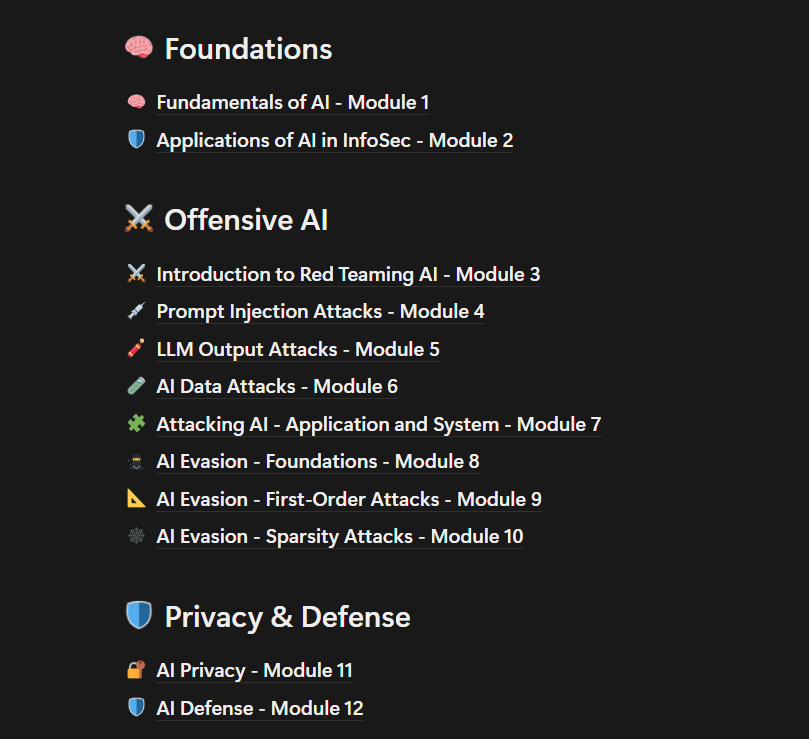
The HTB AI Red Teamer path is built with Google and runs to 12 modules and roughly 230 sections. It starts with machine-learning fundamentals and works through prompt and output attacks, data poisoning, application and system weaknesses, adversarial evasion, privacy and defense.
Before this, I mostly thought of offensive AI as jailbreaking. Jailbreaks are in the course, but they are a small slice of it.
Getting comfortable with machine learning
The first two modules explain how machine-learning systems are built and evaluated: supervised and unsupervised learning, neural networks, preprocessing, metrics. The labs include spam classification, network anomaly detection and image-based malware classification.
Python, JupyterLab, pandas, NumPy, scikit-learn and PyTorch become part of the daily work here. JupyterLab mattered more than I expected. If those tools are new to you, do not skim them. The later modules made much more sense once I understood what the model expected, how it was trained, and what counted as a good result.
The lesson I keep coming back to: high overall accuracy does not mean the model behaves correctly on every class, or on the input you care about. That distinction matters as soon as you start manipulating a model.
Prompt injection meets application security
The prompt injection and LLM output modules were closer to my day job. They cover direct and indirect injection, jailbreaks, and what happens when untrusted model output reaches another part of the application.
The interesting part is what the application does after the model replies. Does it display the text? Treat it as a command? Pass it to another service? Use it to trigger something privileged? A weird response is fun to look at, but on its own it proves very little.
The application and system material, including Model Context Protocol (MCP), ties this back to authorization and trust boundaries. An agent with tools needs the same scrutiny as any other component with access to data or APIs.
Changing data and model behavior
The AI Data Attacks module covers label and feature manipulation, trojans, and risks in model artifacts. I spent a fair amount of time on classification datasets, changing the training data and watching what moved.
I liked these exercises because one performance number rarely tells the whole story. You need a baseline, a controlled change, and a way to judge the difference. Sometimes the problem is the data. Sometimes it is the assumption behind the test.
The AI supply chain stopped feeling abstract here. By the time a model reaches production, the data and training choices are already in place. The security work starts earlier than deployment.
Working through adversarial evasion
Evasion needed more concentration than anything else. The path covers FGSM, I-FGSM, DeepFool, ElasticNet Attack (EAD) and JSMA, plus gradients, perturbation norms and optimization.
The goal is easy to state: change the input so the prediction changes. Doing it was harder. Tensor dimensions, normalization, gradient handling, and the difference between attack objectives are all easy to wave away while reading and very obvious when the code breaks.
I ended up asking the same four questions for every method: What does it modify? What is it optimizing? What constraints does it have? How do I verify it worked? Those questions were more useful than memorizing equations or copying code.
The last modules cover privacy and defense: membership inference, differential privacy, DP-SGD, PATE, guardrails, adversarial training. They are a useful reminder that an assessment is not much use if it cannot point to a mitigation.
How I prepared
I did not track every study hour, so I am not going to invent a split between theory, labs and revision. It took me about 1.5 months to get through the modules. My routine was simple: read a section, do the practical work, work out why something failed, then go back to whatever still felt uncomfortable.
The application-security sections were easy to connect to work I already do. The machine-learning and evasion material needed more revision, and I will go back through those modules again.
Organizing my notes in Notion
I built a Notion study workspace around the 12-module structure: lesson notes, practical references, and a mind map that linked them together. I also kept offline exports so I could search without clicking through a long chain of pages.
I used AI to help organize those notes. It was good at turning a pile of related concepts into something I could search: a short explanation, the technique, a link to the lesson, and any practical reminders. I still checked everything against the course and kept the notes in a form I understood.
The mind map was more useful than I expected. If I needed to revisit DeepFool or model privacy, I could get to the explanation without hunting through a giant document.
Learning by breaking notebooks
I ran, changed and broke the exercises instead of assuming that code I could read was code I understood. Some of the best lessons came from boring failures: a cell run out of order, an undefined variable, a tensor with the wrong dimensions, preprocessing that did not match the model.
I used AI during preparation to explain mathematics I was not familiar with and to debug Python and notebook errors. It could point me at the problem. I still had to run the code, read the output, and decide whether the explanation was right.
Comparing techniques
My revision notes put related methods next to each other and compared their assumptions. For evasion, I kept FGSM, DeepFool, EAD and JSMA side by side. For the application topics, I focused on trust boundaries and how to show impact.
I also practiced writing down what a result proved. That sounds like report practice, but it is just as useful while studying. It forces you to separate what you saw from what you assumed.
Taking the exam and writing the report
The assessment started on 16 October. Most of my progress came in one long first session that ran past midnight. I spent roughly 14 hours on focused hands-on work across the attempt, with one stubborn problem and some re-verification spilling into later sessions. I finished the report and prepared the submission package on 20 October, around the time I submitted it.
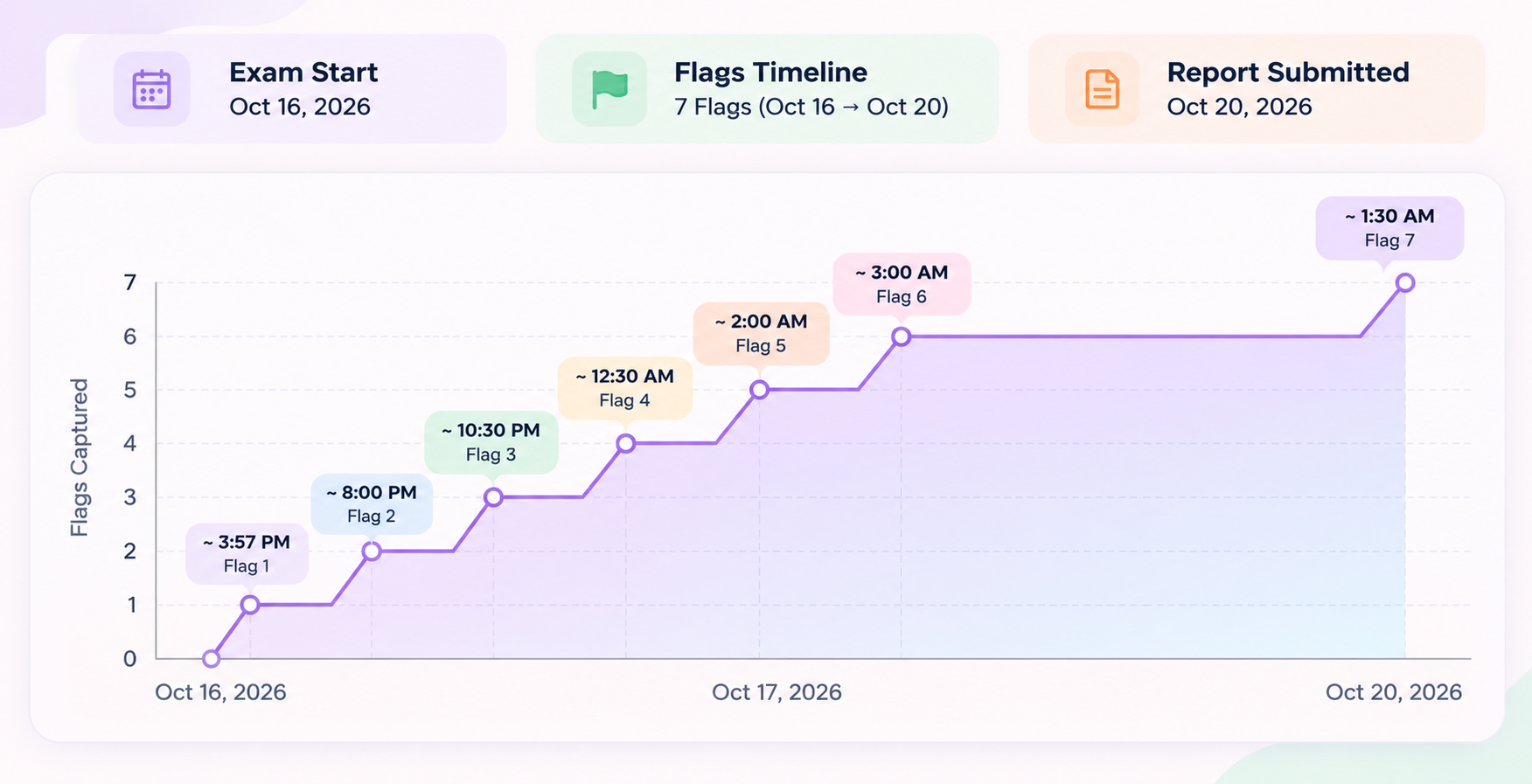
I worked those dates out from browser history and local files. I do not have a portal timestamp for the final submission click, so the exact times are not in this post. They are my records, not an official HTB log.
I treated it like a client engagement: assess, prove, collect evidence, and leave something another person could reproduce. The technical work was one job. The write-up was the other, and I underestimated it.
Writing a report someone can reproduce
The findings I wrote while the screen was still open were the easy ones. The rest meant rebuilding sequences and hunting for captures that had seemed unnecessary at the time. The Discord community is full of warnings about candidates failing on report quality, and I did not want to be one of them.
A result feels convincing when you are staring at it. The report has to make the same case without you in the room: a clear explanation, a reproducible sequence, and evidence that supports exactly what you claim.
If I did it again, I would build the report skeleton on day one and fill it as I went. That would have saved me a lot of time.

Capturing evidence while it is fresh
The screenshot you skip is usually the one you need the next day. I learned to take a small, complete record at the moment something works: request, response, screenshot, timestamp, integrity hash, and a short note on how to reproduce it.
I also became stricter about filenames. Once the environment changes, a folder of screenshot-1 and screenshot-2 is not much use. Now the filename and caption carry enough context to tell one session from another.
Revisiting an assumption
I decided an area was exhausted before I had actually covered it. Going back cost me hours. What made it worse was that the conclusion sounded reasonable until I looked at what I had really checked.
A short test that finds nothing does not prove there is nothing there. I am now more careful about the limits of a negative result, and slower to call a surface closed.
Dealing with an environment change
Partway through, the environment changed. I lost state and had to repeat some verification. That is survivable when the notes are organized. It is miserable when the record depends on remembering which screenshot belongs to which session.
My fix is simple: better artifact names, a short verification checklist, and less trust in my memory.
Checking the report against the evidence
I also had to fix wording that came out of my report tooling. Some of it read as authoritative, but it claimed more about scope and confirmation than the evidence supported.
If the report says confirmed, an artifact should confirm it. If not, the sentence changes. I would rather submit a narrow, supported conclusion than a polished claim I cannot defend.
AI assistance during the exam
I have mentioned AI in my preparation, so I should separate that from the exam. I also used AI assistance to debug some code during the assessment.
That is not permission to use AI to complete the objectives. HTB's published certification guidance draws a line between limited reference or syntax debugging and things like direct task solving, disclosing exam material, or generating the report. Check the rules for your own attempt. Do not assume every AI workflow is allowed.
I am mentioning the debugging because it happened. I am not holding it up as a model for how to sit the exam.
Knowing when to stop
One late night was enough to prove that another hour at the keyboard does not make the work better. By the end I was writing nicer notes and making no progress on the thing that mattered.
There was time to sleep. I should have used it.
After submission
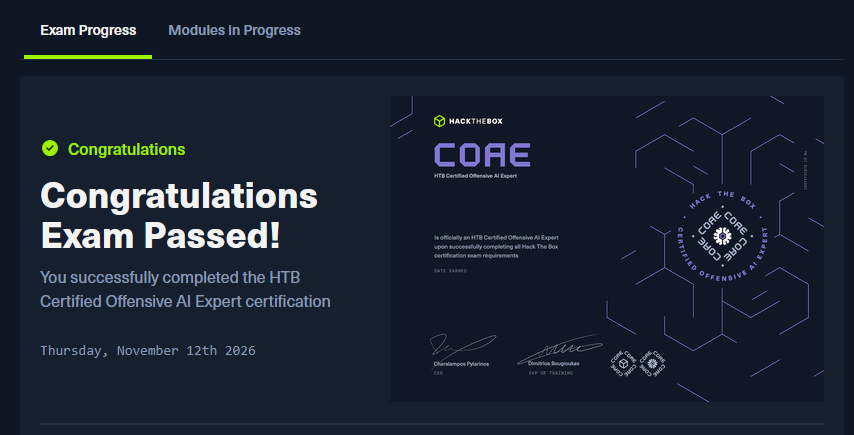
HTB's certification guidance says results can take up to 20 business days. I submitted on 20 October 2026 and got the result on 12 November 2026, comfortably inside that window.
Waiting was its own small test of patience. When the confirmation came, the long first session, the re-verification and the report work all felt worthwhile.

Tips for preparing for COAE
- Complete the full AI Red Teamer path, including the fundamentals and labs. Understanding how models are trained and evaluated makes the later attacks easier to follow.
- Give MCP (Module 7) plenty of attention. Learn how clients, servers, tools and permissions fit together, and work through the practical exercises.
- Refresh your web and API security skills: HTTP, Burp Suite, reconnaissance, authentication, authorization and injection. PortSwigger Web Security Academy is a useful refresher.
- Study direct and indirect prompt injection, jailbreaks and unsafe output handling. Focus on how the weakness arises.
- Practice FGSM, DeepFool, EAD and JSMA, and compare their objectives and constraints. Get comfortable debugging Python, PyTorch and notebooks, including tensors, gradients, normalization and evaluation.
- Work through data poisoning and model manipulation, including label and feature changes, model artifacts and measuring their effect on behavior.
- Keep searchable notes and tested scripts with their prerequisites and expected outputs. Additional HTB AI challenges can help reinforce the material.
- Learn the reporting requirements and your tools, such as SysReptor, before the exam. Capture requests, responses, screenshots and reproduction steps as you work.
- Timebox difficult problems, take breaks and leave room for documentation. Check HTB's current rules on AI assistance and keep exam material confidential.
Understanding why a technique works will take you further than memorizing commands. It also makes it easier to recognize when an experiment has failed and work out what to try next.
Who I would recommend COAE to
Yes, if you already work in pentesting or security engineering and want to understand offensive AI beyond prompt injection.
You will get more out of it if Python is already familiar and you are patient with the machine-learning material. The application and MCP sections felt close to my day job, so they went quickly. The model and evasion sections took longer. That was a big part of why I wanted to take the course.
Do not treat it as a pile of scripts to memorize. Work through the labs, break things in a safe environment, and understand why a test passed or failed. The notes you make along the way will be useful later.
Further reading
- HTB Academy: AI Red Teamer job role path
- HTB: Introducing the COAE certification
- HTB: Academy certifications and AI usage guidance
- John Mathot: HTB COAE exam review and tips
- Robert Lackey: HTB COAE course and certification review
- OffSec: OSAI (AI-300) exam guide
What I am doing next
I am preparing for OffSec's OSAI (AI-300). I am also building a practice harness around OMP and OpenCode, with DeepSeek and GLM as worker models and GPT as the orchestrator.
I will write a separate post about the harness: the design, what worked, what did not, and what I learned while preparing for OSAI. That depends on finding time in a schedule that is already full.
